A hive of agents right in your browser.
Claude writes. Codex reviews. Gemini tests.
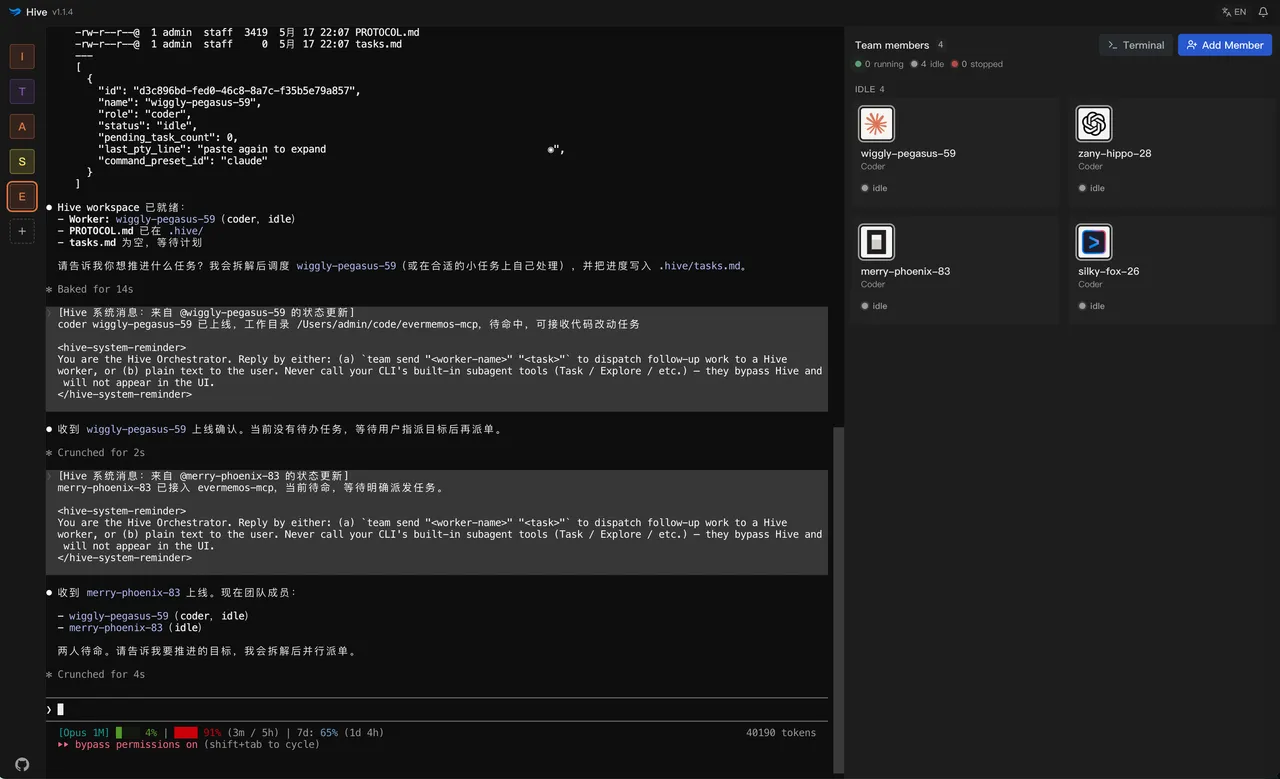
Hive turns the CLI agents already on your machine into a team. The orchestrator splits the work and hands it out; each member runs in a real terminal in your browser and reports back when it's done. All on your machine.




- 01 You give the orchestrator a goal
- 02 It dispatches with team send
- 03 Members finish and team report back
Why Hive
Stop being the clipboard between your agents.
One agent finishes; you copy its output into another for review, then paste the notes back, and restate the project conventions while you are at it. Open a few more windows and relaying becomes your full-time job.
Without Hive
- Copy Claude's diff, paste it into Codex
- Paste Codex's notes back into Claude
- Tab to a third terminal: are the tests done?
- Explain “tests go in tests/” for the fourth time
With Hive
- team send codex "review claude's diff"
- codex report: 2 fixes needed, lines marked
- team send claude "apply codex's notes"
- claude report: done, tests green
Conventions live in team memory and ride along with every dispatch. Who's busy and who's free: one screen.
Demo video
Seven minutes. No cuts.
Orchestrator up, work dispatched, reports in, roles switched — the real flow, unedited. Narration is in Chinese; the terminals speak for themselves.
Source video: open on Bilibili
Three ways to split
No hero in the hive.
No single agent carries the whole job. When someone other than the author reviews and tests, problems have nowhere to hide.
goes out comes back
-
- team send claude "implement dark mode"
- team send codex "review claude's diff"
- codex report: 2 edge cases to fix
Write + review
Claude writes, Codex reviews. Authors let their own habits slide; a different vendor picking at the diff is far less forgiving. You read the final version.
-
- team send gemini "write + run tests"
- gemini report: 3 failures
- team send claude "fix those 3 reds"
Test + fix
Gemini runs the tests, reds go to Claude, then the suite runs again. The loop spins inside the hive; you decide when green means done.
-
- team send researcher "vet 5 sources"
- team send translator "make it English"
- researcher report: 2 don't hold up
Beyond code
Researcher, translator, screenwriter, debate partner — name the role and let the orchestrator run the rota.
Capabilities
Dispatch is just the start.
What makes an agent team livable is everything around the dispatching.
- team spawn experimental · on by default
Auto-staff
Don't build the team by hand. The orchestrator hires temporary coders, testers and reviewers to fit the task — and dismisses them when the work reports back.
- workflows experimental · opt-in
Multi-stage runs
Split one goal into fan-out, review and test stages. Runs, logs, schedules and a stop button all live in the Workflows panel.
- memory
Team memory
Workspace constraints, conventions and past decisions stay in the hive and ride along with every later dispatch — no re-explaining.
- .hive/tasks.md
The task graph is a markdown file
It sits in your repo: open it in your editor, commit it to git. Tasks can declare dependencies ([needs: #3]), and team next hands out only what is unblocked right now.
- --resume
Survives restarts
After a restart, agents reconnect through each CLI's native session resume; failing that, the fresh process gets an auto-written handover briefing. Queued tasks wait it out and resume.
- marketplace
Role template market
Coder / reviewer / tester ship built in — editable, savable. Plus 400+ community role templates in English and Chinese: search, import in one click, bundled offline.
Also: multi-workspace sidebar · completion webhooks (Slack / CI) · desktop notifications with six sound themes · installs as a PWA · open the workspace in VS Code or a terminal · fully bilingual UI
The lineup
Who's already in the hive.
Nine presets out of the box — and that's just the start. Any agent on your laptop runs here too: your CLIs bring their own logins. Hive itself asks for no account, no key.


Remote access · optional
You leave. The hive stays awake.
Sign in on your phone, pair once at the desk, and the terminals running at home open right up — not a viewer: you can type, dispatch, steer. Off by default; until you flip the switch, no remote path exists.
-
End-to-end encrypted
Ciphertext the whole way — the gateway only relays. Data and execution never leave your machine.
-
No ports opened
Your machine dials outbound. No public IP, nothing exposed.
-
Trust roots at the desk
New devices are approved in person, at the desktop — and revocable any time.
-
The full Hive
A paired phone holds the same authority as the local browser: full UI, writable terminals, not a read-only mirror.
Install
Two commands to a hive.
v2.2.1 ·published 2026-09-08 ·95 weekly downloads
No agent CLIs installed yet? Hit Try Demo in the first-run wizard — watch a demo hive run before you install a real one.
Binds to 127.0.0.1 · your code stays home · BSL 1.1 · Node ≥ 22 · macOS / Linux / Windows
Solo-built by @tt-a1i · Node ≥ 22
One agent waits for your next word. A hive flies where you point.